Candy AI app: install it on iPhone and Android
Candy AI has no native iOS or Android app. It runs in your phone’s browser and can be installed as a Progressive Web App (PWA): open the site, choose Add to Home Screen, and it launches from an icon like any other app. This is what Candy AI’s help center says, as checked on 13 November 2026.
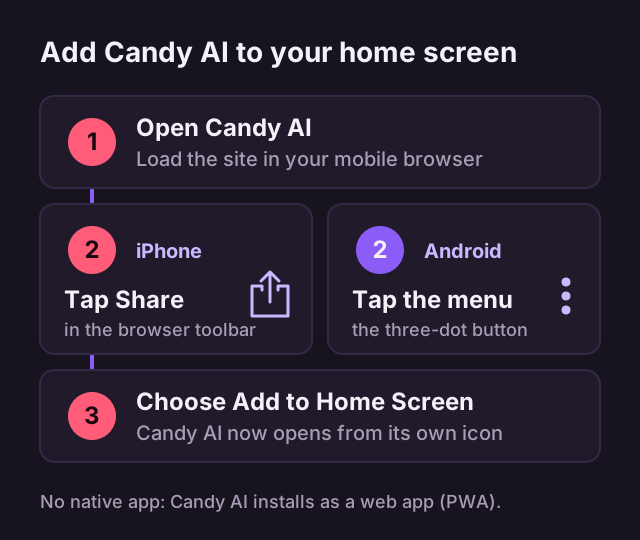
Install on iPhone or iPad
-
Open Candy AI
Load the site in your mobile browser.
-
Tap Share
Use the Share button in the browser toolbar.
-
Choose Add to Home Screen
Candy AI now opens from its own icon.
Install on Android
-
Open Candy AI
Load the site in your mobile browser.
-
Tap the three-dot menu
It opens the browser options.
-
Choose Add to Home Screen
The icon is added to your home screen.
What changes after installing
According to the help center, the installed web app removes the browser’s address bar and enables push notifications. It is still the same website, so you sign in with the same Candy AI account, and nothing is fetched from an app marketplace.
Because there is no native app, treat any download that calls itself a Candy AI app with caution. The route described here needs only your browser.
Signing in on your phone
The installed web app opens the same site, where the top of the page offers Login and Join Free. A free account allows 5 messages, one custom character and one generated image; the Candy AI pricing page shows what each plan adds.
Mobile notes
- Live Action scenes are currently available on mobile only.
- Voice calls are in beta, and the browser needs permission to use your microphone.
- If the site will not load or log you in, update the browser and clear its cache and cookies. The Candy AI FAQ lists every login fix.
On a computer
On a laptop or desktop there is nothing to install: Candy AI runs in the browser. The Candy AI features page describes what you can do once you are in.
Open Candy AI on your phone
Load the site in your mobile browser, then add it to your home screen.